
Software
Process Instrument Explorer (PIE) Software
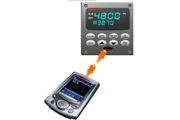
Process Instrument Explorer configures supported Honeywell universal digital controllers from a PC or pocket PC.
Process Instrument Explorer configures supported Honeywell universal digital controllers from a PC or pocket PC. Infrared, serial and Ethernet connections provide access to instrument setup and maintenance information. Users can record settings, investigate faults and plan maintenance through a software interface, with multiple published language options supporting teams that manage a fleet of panel instruments.
Features & Benefits
- Connections
- Infrared, RS485 and Ethernet
- Simplifies configuration records and troubleshooting
Applications
- Honeywell digital-controller setup and maintenance
Detailed capabilities
What Is It?
PIE provides PC or pocket-PC access to supported Honeywell controller setup and maintenance information. Interfaces include infrared with optional RS485/Ethernet arrangements, and several user languages are listed. Current parameters, inputs, alarms and sensor/internal faults can be reviewed for maintenance and configuration archiving rather than only through the controller's front panel.
How Does It Work?
Infrared connects without opening a wired access path, preserving the stated NEMA4X/IP66 enclosure integrity. Users upload/download configurations, save them for review or modification and restore them as appropriate. The source also describes configuring alarm email behavior. That function depends on the supported controller/communication setup rather than implying any disconnected controller can independently send email.
What Problems Does It Solve?
Remote configuration and retained files reduce repeated manual setup and aid troubleshooting or replacement. Maintenance information supports proactive planning while optional communication paths fit different installations. Historical pocket-PC and infrared references are kept as source-specific methods, without promising unverified compatibility with current phones or operating systems.
Software & Interface
- System Requirements
- IR (Actisys ACT-IR220Lplus), RS485, Ethernet (10/100BaseT); Windows XP, Windows Vista
Communication & Protocols
- Supported Platforms
- Pocket PC, Desktop, Laptop
- Languages Supported
- UDC: English, French, German, Italian, Spanish, UDA: English, French, German, Italian, Spanish, Russian, Turkish, Polish, Czech
Technical Specifications
- Supported Connections
- Infrared (IR), RS485 Modbus RTU, Ethernet (Modbus TCP, PC only)
Device & Network Capacity
- Maximum Devices on Network
- 31 units (Modbus RTU network)
Applications & Compatibility
- Instrument Compatibility
- UDA2182 Analyzer; UDC2500, UDC3200, UDC3500 Controllers
| Parameter | Published value / configuration |
|---|---|
| System Requirements | IR (Actisys ACT-IR220Lplus), RS485, Ethernet (10/100BaseT); Windows XP, Windows Vista |
| Supported Platforms | Pocket PC, Desktop, Laptop |
| Languages Supported | UDC: English, French, German, Italian, Spanish, UDA: English, French, German, Italian, Spanish, Russian, Turkish, Polish, Czech |
| Supported Connections | Infrared (IR), RS485 Modbus RTU, Ethernet (Modbus TCP, PC only) |
| Maximum Devices on Network | 31 units (Modbus RTU network) |
| Instrument Compatibility | UDA2182 Analyzer; UDC2500, UDC3200, UDC3500 Controllers |
Values retain manufacturer model qualifications. Review Honeywell specifications ↗
Resources
Resources linked from the manufacturer’s page. Confirm the document revision and applicable model before installation or ordering.
Honeywell resource listing ↗Manufacturer sources
Last source check: 2026-11-02
Process Instrument Explorer (PIE) Software Image · Manufacturer ownership retained; republication licence not independently confirmed
ABID Automation LTD maintains this independent product reference. Honeywell owns its product names and trademarks. Current manufacturer documentation governs specification, availability and certification.
Your next project. A clear starting point.
Tell us about your facility and what you need to achieve.