
Operations
Experion® Station
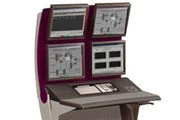
Experion Station provides the operating interface for Experion PKS through console or desktop arrangements.
Experion Station provides the operating interface for Experion PKS through console or desktop arrangements. Console and Flex Station options serve different plant and user needs, with multi-display, keyboard and touchscreen support. Shared workspaces, alarms and trends help operators understand process conditions, while suitable station combinations provide engineering, maintenance and geographically distributed access within one system.
Features & Benefits
- Station types
- Console Station and Flex Station
- Displays
- Up to four monitors as published
- Provides consistent operating and support interfaces
Applications
- Control rooms
- Distributed operations
- Engineering and maintenance access
Detailed capabilities
Product and configuration
Experion Station provides the operating interface for Experion PKS through console or desktop arrangements. Console and Flex Station options serve different plant and user needs, with multi-display, keyboard and touchscreen support. Shared workspaces, alarms and trends help operators understand process conditions, while suitable station combinations provide engineering, maintenance and geographically distributed access within one system.
- Station types: Console Station and Flex Station
- Displays: Up to four monitors as published
Operation and integration
Console Stations can form a shared operator workspace for controls, displays, alarms and events. Flex Stations share connection capacity among occasional or distributed users. Desktop or console arrangements support multiple monitors, operator keyboards and touchscreens, with HMIWeb libraries for application displays.
Application and selection
Different Station types can coexist in one system to balance control-room availability with engineering, maintenance and casual access. Trending, group/detail views and consistent navigation help users interpret the process; station selection follows the intended operating workload.
Part Number
Published part numbers
10 parts
| Part Number | Description | Enquiry |
|---|---|---|
| 51150648-100 | DISPLAY PORT TO VGA PORT ADAPTER CABLE | Request quotation |
| 51153629-200 | SPRING, GAS DAMPED FORCE 67LB | Request quotation |
| 51153667-100 | IF MOD FLKM RJ45/8S | Request quotation |
| 51153686-911 | CONTROL BOX, FOR 110V 60HZ POWER | Request quotation |
| 51153689-300 | KIT GAS SPRING REPL ICON CTR POPUP KB | Request quotation |
| 51153701-903 | MEM UPG 1GB (2X512MB) DDR2 (PE1800) | Request quotation |
| 51153715-100 | TRANS PLATE 21.3IN FPD ICON | Request quotation |
| 51153726-200 | INTEL PRO/1000 MT SERVER ADAPTER | Request quotation |
| 51153729-101 | DRIVE IDE DVD+/-RW DUAL LAYER | Request quotation |
| 51153729-102 | DRIVE, IDE DVD+/-RW DUAL LAYER | Request quotation |
Manufacturer sources
Last source check: 2026-11-02
Experion® Station Image · Manufacturer ownership retained; republication licence not independently confirmed
ABID Automation LTD maintains this independent product reference. Honeywell owns its product names and trademarks. Current manufacturer documentation governs specification, availability and certification.
Your next project. A clear starting point.
Tell us about your facility and what you need to achieve.